

Showing posts with label Oracle Core DBA. Show all posts
Showing posts with label Oracle Core DBA. Show all posts


OEM 13C Installation Steps
Pre Requisites:
- Install Linux 6 OS or more than that.
- Create Directory structure and grant permissions,
mkdir -p /oracle/product/database
chown -Rf oracle:oinstall /oracle
chmod -Rf 755 /oracle
- Install Database 12c and use the below document while sizing the parameters.
- Download OEM13C software,
em13100_linux64-2.zip
em13100_linux64-5.zip
em13100_linux64-3.zip
em13100_linux64-4.zip
Note:
- Installs Oracle WebLogic Server 12c Release 1 (12.1.3.0).
- Installs Java Development Kit (JDK) 1.7.0_80.
- Installs Oracle Management Service 13c Release 1.
- Installs Oracle Management Agent 13c Release 1 in the agent base directory you specify (outside the middleware home).
- Installs Oracle JRF 12c Release 1 (12.1.3.0), which includes the oracle_common directory.
- Installs Oracle Web Tier 12c Release 1 (12.1.3.0).
- Installs Oracle BI Publisher 12c Release 1 (12.1.3.0), which includes the bi directory.
Installation Steps:
The installer requires about 10 GB of hard disk space in the temporary directory. If your temporary directory does not have this space, then pass the -J-Djava.io.tmpdir parameter and provide an alternative directory where there is 10 GB of space.
I've created TEMP directory in / mountpoint.
Run em13100_linux64.bin under oracle user,
./em13100_linux64.bin -J-Djava.io.tmpdir=/TEMP

 |
| Unpick security Updates |
 |
| Skip Patch Updates |
 |
| Note: For test purpose I've ignored some of pre-checks, In your case all pre-checks have to succeeded |
 |
| Type of Installation up to you |
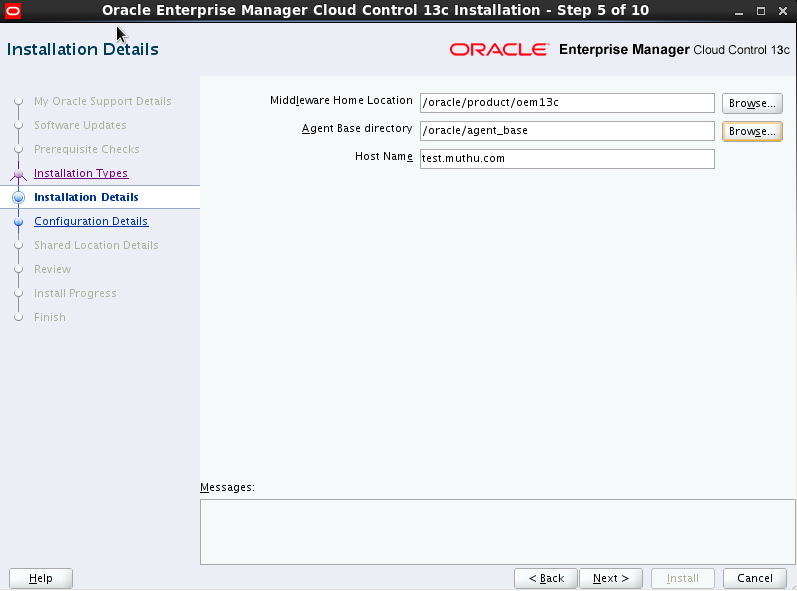 |
| Specify Software installation directory location |
 |
| Specify password and Pluggable DB details. |
 |
| While DB installation make sure the character set. |

 |
Make false of optimizer_adaptive_features parameter
|
 |
Disable Gather Stats and alter the parallel Max and Min servers parameter as per recommendation.
|
 |
Change shared_pool_size and session_cached_cursors parameter as per recommendation.
|
 |
| Click Install |


 |
| Run allroot.sh under root user |


How to clone the Oracle Client Software
Cloning
of Oracle Client:
1.
Tar the Oracle Client home from the source server.
tar
-cvf file_name.tar product
2.
scp the tar file to the new server
3.
Untar the file at the location from where we want like the same directory path like the source server. tar -xvf file_name.tar
4.
Now start the cloning.
export
ORACLE_HOME=/opt/oracle/product/11.2.0
export
PATH=$ORACLE_HOME/bin:$PATH:
$ORACLE_HOME/oui/bin/runInstaller
-silent -clone ORACLE_BASE="/opt/oracle/"
ORACLE_HOME="/opt/oracle/product/11.2.0"
ORACLE_HOME_NAME="Oracle11201_client"
-invPtrLoc="/opt/projects/oracle/oraInventory"
Note:
The above command need to run in single line.
Useful
DOC IDs:
- Master Note For Oracle Database Client Installation (Doc ID 1157463.1)
- Install / Deinstall / Cloning Assistant: Oracle Database / Client (Doc ID 1555012.2)
Oracle LIO and Oracle PIO
- An Oracle LIO (or logical read call) occurs any time the Oracle kernel requests access to an Oracle block in the database buffer cache. If the kernel cannot find a specified Oracle block in the database buffer cache, then the LIO motivates an Oracle PIO call. In accounting for LIO elapsed times, we do not include the time spent executing the PIO portion of the LIO call. The number of LIO calls for a session is the sum of the values in v$sesstat for the statistics named “db block gets” and “consistent gets.”
- An Oracle PIO (or physical read call) occurs when the Oracle kernel executes an operating system (OS) read call for an Oracle database block. In accounting for PIO elapsed times, we include only the time that the Oracle kernel spends waiting for the execution of the OS read call. A PIO may or may not engage the service of an actual disk drive; if the OS can fulfill the read call from memory (e.g., disk controller cache or OS buffer cache), then the PIO will be satisfied without actually incurring the latency of a read from disk. For a single OS call that reads multiple blocks, each block counts as one PIO. In accounting for PIO elapsed times, we do not include the time spent executing the LIO that motivated the PIO. The most common type of PIO is counted in the v$sesstat value for the statistic named “physical reads.”
ORAAGENT or ORAROOTAGENT High Resource (CPU, Memory etc) Usage
Issue:
11gR2 Grid Infrastructure oraagent.bin or orarootagent.bin process uses high CPU, memory and threads. If the cluster node is up and running for very long time, it could exhaust memory and swap space which could result in node eviction or other stability issue. With OS "top" or other memory monitoring tool, we can see huge virtual memory is allocated and increasing over
time:
PID USER PR NI VIRT RES SHR S %CPU %MEM TIME+ COMMAND
7242 oracle 18 0 308g 953m 14m S 83.2 0.7 166:28.72 oraagent.bin
In above example, 308GB of virtual memory is allocated to the agent process while it's consuming 83.2% of CPU
Solution:
It's recommended to apply latest patch set or PSU. But if patches are unavailable or can not be applied, the workaround is to kill agent process during off peak hour. There should be no impact as agent will be respawned automatically.
To kill agent process with pid 7242: kill -9 7242
Oracle’s Extensive Product List
|
Oracle
Cloud
|
Software as a Service (SaaS)
|
|
Platform as a Service (PaaS)
|
|
|
Infrastructure as a Service (IaaS)
|
|
|
Applications
|
Customer Experience
|
|
Enterprise Performance Management
|
|
|
Enterprise Resource Planning
|
|
|
Human Capital Management
|
|
|
Supply Chain Management
|
|
|
Industry Applications
|
|
|
Applications Product Lines
|
|
|
Database
|
Oracle Database
|
|
Real Application Clusters
|
|
|
Data Warehousing
|
|
|
Database Security
|
|
|
MySQL
|
|
|
Berkeley DB
|
|
|
TimesTen In-Memory Database
|
|
|
Java
|
Java Platforms
|
|
Java Embedded
|
|
|
Java for Mobile
|
|
|
Oracle Java Cloud Service
|
|
|
Developer
Tools
|
Java
|
|
Business Intelligence
|
|
|
Oracle Database and PL/SQL
|
|
|
.NET
|
|
|
Operating
Systems
|
Oracle Solaris
|
|
Oracle Linux
|
|
|
Middleware
|
Cloud Application Foundation
|
|
Data Integration
|
|
|
Business Analytics
|
|
|
Identity Management
|
|
|
Service-Oriented Architecture
|
|
|
Business Process Management
|
|
|
WebCenter
|
|
|
WebLogic
|
|
|
Enterprise
Management
|
Cloud Management
|
|
Application Management
|
|
|
Database Management
|
|
|
Middleware Management
|
|
|
Hardware and Virtualization
Management
|
|
|
Heterogeneous Management
|
|
|
Lifecycle Management
|
|
|
Engineered
Systems
|
Big Data Appliance
|
|
Exadata Database Machine
|
|
|
Exalogic Elastic Cloud
|
|
|
Exalytics In-Memory Machine
|
|
|
Database Appliance
|
|
|
Oracle SuperCluster
|
|
|
Oracle Virtual Compute Appliance
|
|
|
Oracle ZFS Storage Appliance
|
|
|
Servers
|
SPARC
|
|
x86
|
|
|
Blade
|
|
|
Netra
|
|
|
Storage
and Tape
|
SAN Storage
|
|
NAS Storage
|
|
|
Tape Storage
|
|
|
Networking
and Data Center Fabric Products
|
Virtual Networking
|
|
Ethernet Networking
|
|
|
InfiniBand Networking
|
|
|
Storage Networking
|
|
|
Enterprise
Communications
|
Enterprise Session Border Controller
|
|
Enterprise Operation Monitor
|
|
|
Enterprise Communications Broker
|
|
|
WebRTC Session Controller
|
|
|
Application Session Controller
|
|
|
Interactive Session Recorder
|
|
|
Virtualization
|
Oracle Secure Global Desktop
|
|
Oracle VM for x86
|
|
|
Oracle VM for SPARC
|
How Parsing Works

1. Include VPD predicates: If Virtual Private Database (VPD, formerly known as row-level security)
is in use and active for one of the tables referenced in the parsed SQL
statement, the predicates generated by the security policies are included in
its WHERE clause.
2. Check syntax, semantics, and access
rights: This step makes sure not only that the SQL statement is correctly
written but also that all objects referenced by the SQL statement exist and the
user parsing it has the necessary privileges to access them.
3. Store parent cursor in a shared SQL
area: Whenever a shareable parent cursor isn’t yet available, some
memory is allocated from the library cache, and a new parent cursor is stored
inside it.
4. Generate execution plan: During this phase, the query optimizer produces an execution plan
for the parsed SQL statement.
5. Store child cursor in a shared SQL area: Some memory is allocated, and the shareable child cursor is
stored inside it and associated with its parent cursor.

EBS R12.2 installation steps
Pre-Installation steps:
Kernel parameter:
vi /etc/sysctl.conf
kernel.shmall = 4294967296
kernel.shmmax=2147483648
kernel.sem=250 32000 100 128
fs.file-max=65536
net.ipv4.ip_local_port_range = 2024 65000
vi /etc/security/limit.conf
oracle hard nofile 4096
oracle soft nofile 4096
vi /etc/pam.d/login
session
required pam_limits.so
User and Group Creation:
useradd oracle
groupadd dba
usermod -G dba -a oracle
Create password for oracle (in my case both apps and database are oracle user) user,
#passwd oracle
Create ORACLE_BASE directory:
mkdir -p /oracle/product
Create oraInventory directory in /oracle location
Create oraInst.loc file in oraInventory directory and
/etc
Enter the below text in oraInst.loc file
inventory_loc=/oracle/oraInventory
Create softlink if libdb.so.2 is not there, (for avoid login page issue in post installation steps)
ln -s /usr/lib/libgdbm.so.2.0.0 /usr/lib/libdb.so.2
libdb.so.2 -> /usr/lib/libgdbm.so.2.0.0
Set up the Stage Area:-
Ø Kindly Read the below instruction before
running buildstage.sh script,
================================================================
The staging area should consist of a top-level
directory with subdirectories startCD, EBSInstallMedia, TechInstallMedia, and
TechPatches.
The startCD directory contains Rapid Install itself (in
a subdirectory called Disk1), plus supporting files and documentation.
The EBSInstallMedia directory should contain the
following subdirectories:
AppDB (Oracle
E-Business Suite Database)
Apps (Oracle
E-Business Suite products)
AS10.1.2
(Oracle Application Server 10.1.2)
The TechInstallMedia directory should contain the
following subdirectories:
database
(Oracle11gR2 ORACLE_HOME)
ohs11116
(Oracle HTTP Server)
wls1036_generic (Oracle WebLogic Server, part of Oracle Fusion
Middleware)
The TechPatches directory should contain the following
subdirectories:
MiddleTier
(Application tier patches)
DB (Database
Tier patches)
Please note that you
should NOT download the following files while creating the R12.2 Rapid install
Stage: (for avoid "Fatal Error: TXK Install Service" issue during the installation)
1.
Oracle Database Lite 10g Release 3
(10.3.0.3.0) for Linux x86 V20223-01.zip
2.
Oracle SOA Suite 11g Patch Set 5 (11.1.1.6.0) for Price Protection
V29672-01_1of2.zip
V29672-01_2of2.zip
3.
Oracle Data Integrator 11g (11.1.1.6.0) for Generic
V29762-01_1of2.zip
V29762-01_2of2.zip
4.
Oracle Portal, Forms, Reports and Discoverer 11g (11.1.1.2.0) for Linux x86-64
V18772-01_1of4.zip
V18772-01_2of4.zip
V18772-01_3of4.zip
V18772-01_4of4.zip
5.
Oracle Portal, Forms, Reports and Discoverer 11g Patch Set 5 (11.1.1.6.0) for
Linux x86-64
V29883-01.zip
These
files DO NOT belong to the R12.2 shiphome.
They should be
downloaded to a different location than the R12.2 Rapid install stage.
============================================================
unzip V35215-01_1of3 to V35215-01_1of3
(Rapid_install_starts_here_part (1 to 3))
It will create startCD folder....
[oracle@testvm bin]$ ./buildStage.sh
Build Stage Menu
------------------------------------------------------
1. Create new stage area
2. Copy new patches to current stage area.
3. Display existing files in stage TechPatches.
4. Exit menu
Enter your choice [4]: 1
Rapid Install Platform Menu
------------------------------------------------------
1. Oracle Solaris SPARC (64-bit)
2. Linux x86-64
3. IBM AIX on Power Systems (64-bit)
4. HP-UX Itanium
5. Exit Menu
Enter your choice [5]: 2
/mnt/hgfs/Software/R122vision/startCD/Disk1/rapidwiz/bin/../jre/Linux_x64/1.6.0/bin/java -classpath /mnt/hgfs/Software/R122vision/startCD/Disk1/rapidwiz/bin/../jlib/emocmutl.jar:/mnt/hgfs/Software/R122vision/startCD/Disk1/rapidwiz/bin/../jlib/ewt-3_4_22.jar:/mnt/hgfs/Software/R122vision/startCD/Disk1/rapidwiz/bin/../jlib/share-1_1_18.jar:/mnt/hgfs/Software/R122vision/startCD/Disk1/rapidwiz/bin/../jlib/jnls.jar:/mnt/hgfs/Software/R122vision/startCD/Disk1/rapidwiz/bin/../jlib/ACC.JAR:/mnt/hgfs/Software/R122vision/startCD/Disk1/rapidwiz/bin/../jlib/netcfg.jar:/mnt/hgfs/Software/R122vision/startCD/Disk1/rapidwiz/bin/../jlib/ojdbc14.jar:/mnt/hgfs/Software/R122vision/startCD/Disk1/rapidwiz/bin/../jlib/OraInstaller.jar:/mnt/hgfs/Software/R122vision/startCD/Disk1/rapidwiz/bin/../jlib/java oracle.apps.ad.rapidwiz.util.StageBuilder /mnt/hgfs/Software/R122vision/startCD/Disk1/rapidwiz/bin
Please enter the directory containing the zipped installation media:
/mnt/hgfs/Software/R122vision
Unzipping V29764-01.zip
Unzipping V29856-01.zip
Unzipping V35215-01_1of3.zip
Unzipping V35215-01_2of3.zip
Unzipping V35215-01_3of3.zip
Unzipping V35230-01_1of2.zip
Unzipping V35230-01_2of2.zip
Unzipping V35231-01_1of5.zip
Unzipping V35231-01_2of5.zip
Unzipping V35231-01_3of5.zip
Unzipping V35231-01_4of5.zip
Unzipping V35231-01_5of5.zip
Unzipping V35802-01.zip
Unzipping V35803-01_1of3.zip
Unzipping V35803-01_2of3.zip
Unzipping V35803-01_3of3.zip
Unzipping V35804-01_1of2.zip
Unzipping V35804-01_2of2.zip
Unzipping V35807-01.zip
Unzipping V35808-01.zip
Unzipping V35809-01.zip
Unzipping V35810-01.zip
Unzipping V35811-01.zip
Unzipping V35812-01.zip
Unzipping V35813-01.zip
Unzipping V37515-01_1of6.zip
Unzipping V37515-01_2of6.zip
Unzipping V37515-01_3of6.zip
Unzipping V37515-01_4of6.zip
Unzipping V37515-01_5of6.zip
Unzipping V37515-01_6of6.zip
Unzipping V39571-01.zip
Unzipping V39615-01.zip
Applying one-off patches
All files have been unzipped.
Stage area is complete.
Done Unzipping shiphome ...
StageBuilder will now stage the tech patches for Linux_x64...
Copying one-off patches to shiphome
/mnt/hgfs/Software/R122vision/startCD/Disk1/rapidwiz/bin/../unzip/Linux_x64/unzip -o /mnt/hgfs/Software/R122vision/startCD/Disk1/rapidwiz/bin/../Xpatches/Linux_x64.zip -d /mnt/hgfs/Software/R122vision/startCD/Disk1/rapidwiz/bin/../../../../TechPatches
Archive: /mnt/hgfs/Software/R122vision/startCD/Disk1/rapidwiz/bin/../Xpatches/Linux_x64.zip
creating: /mnt/hgfs/Software/R122vision/startCD/Disk1/rapidwiz/bin/../../../../TechPatches/DB/16303726/
extracting: /mnt/hgfs/Software/R122vision/startCD/Disk1/rapidwiz/bin/../../../../TechPatches/DB/16303726/p16303726_112030_Linux-x86-64.zip
creating: /mnt/hgfs/Software/R122vision/startCD/Disk1/rapidwiz/bin/../../../../TechPatches/DB/14123213/
extracting: /mnt/hgfs/Software/R122vision/startCD/Disk1/rapidwiz/bin/../../../../TechPatches/DB/14123213/p14123213_112030_Linux-x86-64.zip
creating: /mnt/hgfs/Software/R122vision/startCD/Disk1/rapidwiz/bin/../../../../TechPatches/DB/13923995/
extracting: /mnt/hgfs/Software/R122vision/startCD/Disk1/rapidwiz/bin/../../../../TechPatches/DB/13923995/p13923995_112030_Linux-x86-64.zip
creating: /mnt/hgfs/Software/R122vision/startCD/Disk1/rapidwiz/bin/../../../../TechPatches/DB/14751895/
extracting: /mnt/hgfs/Software/R122vision/startCD/Disk1/rapidwiz/bin/../../../../TechPatches/DB/14751895/p14751895_112030_Linux-x86-64.zip
creating: /mnt/hgfs/Software/R122vision/startCD/Disk1/rapidwiz/bin/../../../../TechPatches/DB/16163946/
extracting: /mnt/hgfs/Software/R122vision/startCD/Disk1/rapidwiz/bin/../../../../TechPatches/DB/16163946/p16163946_112030_Linux-x86-64.zip
creating: /mnt/hgfs/Software/R122vision/startCD/Disk1/rapidwiz/bin/../../../../TechPatches/DB/14207902/
extracting: /mnt/hgfs/Software/R122vision/startCD/Disk1/rapidwiz/bin/../../../../TechPatches/DB/14207902/p14207902_112030_Linux-x86-64.zip
creating: /mnt/hgfs/Software/R122vision/startCD/Disk1/rapidwiz/bin/../../../../TechPatches/DB/15967134/
extracting: /mnt/hgfs/Software/R122vision/startCD/Disk1/rapidwiz/bin/../../../../TechPatches/DB/15967134/p15967134_112030_Linux-x86-64.zip
creating: /mnt/hgfs/Software/R122vision/startCD/Disk1/rapidwiz/bin/../../../../TechPatches/DB/16438289/
extracting: /mnt/hgfs/Software/R122vision/startCD/Disk1/rapidwiz/bin/../../../../TechPatches/DB/16438289/p16438289_112030_Linux-x86-64.zip
creating: /mnt/hgfs/Software/R122vision/startCD/Disk1/rapidwiz/bin/../../../../TechPatches/DB/13931044/
extracting: /mnt/hgfs/Software/R122vision/startCD/Disk1/rapidwiz/bin/../../../../TechPatches/DB/13931044/p13931044_112030_Linux-x86-64.zip
creating: /mnt/hgfs/Software/R122vision/startCD/Disk1/rapidwiz/bin/../../../../TechPatches/DB/16342486/
extracting: /mnt/hgfs/Software/R122vision/startCD/Disk1/rapidwiz/bin/../../../../TechPatches/DB/16342486/p16342486_112030_Linux-x86-64.zip
creating: /mnt/hgfs/Software/R122vision/startCD/Disk1/rapidwiz/bin/../../../../TechPatches/DB/14398795/
extracting: /mnt/hgfs/Software/R122vision/startCD/Disk1/rapidwiz/bin/../../../../TechPatches/DB/14398795/p14398795_112030_Linux-x86-64.zip
creating: /mnt/hgfs/Software/R122vision/startCD/Disk1/rapidwiz/bin/../../../../TechPatches/DB/12951696/
extracting: /mnt/hgfs/Software/R122vision/startCD/Disk1/rapidwiz/bin/../../../../TechPatches/DB/12951696/p12951696_112030_Generic.zip
creating: /mnt/hgfs/Software/R122vision/startCD/Disk1/rapidwiz/bin/../../../../TechPatches/DB/12942119/
extracting: /mnt/hgfs/Software/R122vision/startCD/Disk1/rapidwiz/bin/../../../../TechPatches/DB/12942119/p12942119_112030_Linux-x86-64.zip
creating: /mnt/hgfs/Software/R122vision/startCD/Disk1/rapidwiz/bin/../../../../TechPatches/DB/14698700/
extracting: /mnt/hgfs/Software/R122vision/startCD/Disk1/rapidwiz/bin/../../../../TechPatches/DB/14698700/p14698700_112030_Generic.zip
creating: /mnt/hgfs/Software/R122vision/startCD/Disk1/rapidwiz/bin/../../../../TechPatches/DB/16587934/
extracting: /mnt/hgfs/Software/R122vision/startCD/Disk1/rapidwiz/bin/../../../../TechPatches/DB/16587934/p16587934_112030_Linux-x86-64.zip
creating: /mnt/hgfs/Software/R122vision/startCD/Disk1/rapidwiz/bin/../../../../TechPatches/DB/16105745/
extracting: /mnt/hgfs/Software/R122vision/startCD/Disk1/rapidwiz/bin/../../../../TechPatches/DB/16105745/p16105745_112030_Generic.zip
creating: /mnt/hgfs/Software/R122vision/startCD/Disk1/rapidwiz/bin/../../../../TechPatches/DB/16040940/
extracting: /mnt/hgfs/Software/R122vision/startCD/Disk1/rapidwiz/bin/../../../../TechPatches/DB/16040940/p16040940_112030_Linux-x86-64.zip
extracting: /mnt/hgfs/Software/R122vision/startCD/Disk1/rapidwiz/bin/../../../../TechPatches/MiddleTier/13583235/p13583235_1036_Generic.zip
creating: /mnt/hgfs/Software/R122vision/startCD/Disk1/rapidwiz/bin/../../../../TechPatches/MiddleTier/14825718/
extracting: /mnt/hgfs/Software/R122vision/startCD/Disk1/rapidwiz/bin/../../../../TechPatches/MiddleTier/14825718/p14825718_10123_LINUX.zip
creating: /mnt/hgfs/Software/R122vision/startCD/Disk1/rapidwiz/bin/../../../../TechPatches/MiddleTier/14353879/
extracting: /mnt/hgfs/Software/R122vision/startCD/Disk1/rapidwiz/bin/../../../../TechPatches/MiddleTier/14353879/p14353879_10123_LINUX.zip
creating: /mnt/hgfs/Software/R122vision/startCD/Disk1/rapidwiz/bin/../../../../TechPatches/MiddleTier/14614795/
extracting: /mnt/hgfs/Software/R122vision/startCD/Disk1/rapidwiz/bin/../../../../TechPatches/MiddleTier/14614795/p14614795_101231_LINUX.zip
creating: /mnt/hgfs/Software/R122vision/startCD/Disk1/rapidwiz/bin/../../../../TechPatches/MiddleTier/16209520/
extracting: /mnt/hgfs/Software/R122vision/startCD/Disk1/rapidwiz/bin/../../../../TechPatches/MiddleTier/16209520/p16209520_10123_GENERIC.zip
creating: /mnt/hgfs/Software/R122vision/startCD/Disk1/rapidwiz/bin/../../../../TechPatches/MiddleTier/16275529/
extracting: /mnt/hgfs/Software/R122vision/startCD/Disk1/rapidwiz/bin/../../../../TechPatches/MiddleTier/16275529/p16275529_10105_LINUX.zip
creating: /mnt/hgfs/Software/R122vision/startCD/Disk1/rapidwiz/bin/../../../../TechPatches/MiddleTier/14597598/
extracting: /mnt/hgfs/Software/R122vision/startCD/Disk1/rapidwiz/bin/../../../../TechPatches/MiddleTier/14597598/p14597598_1036_Generic.zip
creating: /mnt/hgfs/Software/R122vision/startCD/Disk1/rapidwiz/bin/../../../../TechPatches/MiddleTier/14577216/
extracting: /mnt/hgfs/Software/R122vision/startCD/Disk1/rapidwiz/bin/../../../../TechPatches/MiddleTier/14577216/p14577216_101231_Generic.zip
creating: /mnt/hgfs/Software/R122vision/startCD/Disk1/rapidwiz/bin/../../../../TechPatches/MiddleTier/16784403/
extracting: /mnt/hgfs/Software/R122vision/startCD/Disk1/rapidwiz/bin/../../../../TechPatches/MiddleTier/16784403/p16784403_101232_LINUX.zip
creating: /mnt/hgfs/Software/R122vision/startCD/Disk1/rapidwiz/bin/../../../../TechPatches/MiddleTier/14386347/
extracting: /mnt/hgfs/Software/R122vision/startCD/Disk1/rapidwiz/bin/../../../../TechPatches/MiddleTier/14386347/p14386347_111160_Generic.zip
creating: /mnt/hgfs/Software/R122vision/startCD/Disk1/rapidwiz/bin/../../../../TechPatches/MiddleTier/16199894/
extracting: /mnt/hgfs/Software/R122vision/startCD/Disk1/rapidwiz/bin/../../../../TechPatches/MiddleTier/16199894/p16199894_111160_Generic.zip
creating: /mnt/hgfs/Software/R122vision/startCD/Disk1/rapidwiz/bin/../../../../TechPatches/MiddleTier/14374587/
extracting: /mnt/hgfs/Software/R122vision/startCD/Disk1/rapidwiz/bin/../../../../TechPatches/MiddleTier/14374587/p14374587_10123_GENERIC.zip
creating: /mnt/hgfs/Software/R122vision/startCD/Disk1/rapidwiz/bin/../../../../TechPatches/MiddleTier/10152652/
extracting: /mnt/hgfs/Software/R122vision/startCD/Disk1/rapidwiz/bin/../../../../TechPatches/MiddleTier/10152652/p10152652_10123_LINUX.zip
creating: /mnt/hgfs/Software/R122vision/startCD/Disk1/rapidwiz/bin/../../../../TechPatches/MiddleTier/11669923/
extracting: /mnt/hgfs/Software/R122vision/startCD/Disk1/rapidwiz/bin/../../../../TechPatches/MiddleTier/11669923/p11669923_10123_GENERIC.zip
Done Copying additional patches
Verifying stage area...
Directory /mnt/hgfs/Software/R122vision/TechInstallMedia is valid
Directory /mnt/hgfs/Software/R122vision/TechPatches/DB is valid
Directory /mnt/hgfs/Software/R122vision/TechPatches/MiddleTier is valid
Directory /mnt/hgfs/Software/R122vision/EBSInstallMedia/AppDB is valid
Directory /mnt/hgfs/Software/R122vision/EBSInstallMedia/Apps is valid
Directory /mnt/hgfs/Software/R122vision/EBSInstallMedia/AS10.1.2 is valid
Directory /mnt/hgfs/Software/R122vision/TechInstallMedia/database is valid
Directory /mnt/hgfs/Software/R122vision/TechInstallMedia/ohs11116 is valid
Directory /mnt/hgfs/Software/R122vision/TechInstallMedia/wls1036_generic is valid
Stage area verified.
Build Stage Menu
------------------------------------------------------
1. Create new stage area
2. Copy new patches to current stage area.
3. Display existing files in stage TechPatches.
4. Exit menu
Enter your choice [4]: 1
Rapid Install Platform Menu
------------------------------------------------------
1. Oracle Solaris SPARC (64-bit)
2. Linux x86-64
3. IBM AIX on Power Systems (64-bit)
4. HP-UX Itanium
5. Exit Menu
Enter your choice [5]: 2
/mnt/hgfs/Software/R122vision/startCD/Disk1/rapidwiz/bin/../jre/Linux_x64/1.6.0/bin/java -classpath /mnt/hgfs/Software/R122vision/startCD/Disk1/rapidwiz/bin/../jlib/emocmutl.jar:/mnt/hgfs/Software/R122vision/startCD/Disk1/rapidwiz/bin/../jlib/ewt-3_4_22.jar:/mnt/hgfs/Software/R122vision/startCD/Disk1/rapidwiz/bin/../jlib/share-1_1_18.jar:/mnt/hgfs/Software/R122vision/startCD/Disk1/rapidwiz/bin/../jlib/jnls.jar:/mnt/hgfs/Software/R122vision/startCD/Disk1/rapidwiz/bin/../jlib/ACC.JAR:/mnt/hgfs/Software/R122vision/startCD/Disk1/rapidwiz/bin/../jlib/netcfg.jar:/mnt/hgfs/Software/R122vision/startCD/Disk1/rapidwiz/bin/../jlib/ojdbc14.jar:/mnt/hgfs/Software/R122vision/startCD/Disk1/rapidwiz/bin/../jlib/OraInstaller.jar:/mnt/hgfs/Software/R122vision/startCD/Disk1/rapidwiz/bin/../jlib/java oracle.apps.ad.rapidwiz.util.StageBuilder /mnt/hgfs/Software/R122vision/startCD/Disk1/rapidwiz/bin
Please enter the directory containing the zipped installation media:
/mnt/hgfs/Software/R122vision
Unzipping V29764-01.zip
Unzipping V29856-01.zip
Unzipping V35215-01_1of3.zip
Unzipping V35215-01_2of3.zip
Unzipping V35215-01_3of3.zip
Unzipping V35230-01_1of2.zip
Unzipping V35230-01_2of2.zip
Unzipping V35231-01_1of5.zip
Unzipping V35231-01_2of5.zip
Unzipping V35231-01_3of5.zip
Unzipping V35231-01_4of5.zip
Unzipping V35231-01_5of5.zip
Unzipping V35802-01.zip
Unzipping V35803-01_1of3.zip
Unzipping V35803-01_2of3.zip
Unzipping V35803-01_3of3.zip
Unzipping V35804-01_1of2.zip
Unzipping V35804-01_2of2.zip
Unzipping V35807-01.zip
Unzipping V35808-01.zip
Unzipping V35809-01.zip
Unzipping V35810-01.zip
Unzipping V35811-01.zip
Unzipping V35812-01.zip
Unzipping V35813-01.zip
Unzipping V37515-01_1of6.zip
Unzipping V37515-01_2of6.zip
Unzipping V37515-01_3of6.zip
Unzipping V37515-01_4of6.zip
Unzipping V37515-01_5of6.zip
Unzipping V37515-01_6of6.zip
Unzipping V39571-01.zip
Unzipping V39615-01.zip
Applying one-off patches
All files have been unzipped.
Stage area is complete.
Done Unzipping shiphome ...
StageBuilder will now stage the tech patches for Linux_x64...
Copying one-off patches to shiphome
/mnt/hgfs/Software/R122vision/startCD/Disk1/rapidwiz/bin/../unzip/Linux_x64/unzip -o /mnt/hgfs/Software/R122vision/startCD/Disk1/rapidwiz/bin/../Xpatches/Linux_x64.zip -d /mnt/hgfs/Software/R122vision/startCD/Disk1/rapidwiz/bin/../../../../TechPatches
Archive: /mnt/hgfs/Software/R122vision/startCD/Disk1/rapidwiz/bin/../Xpatches/Linux_x64.zip
creating: /mnt/hgfs/Software/R122vision/startCD/Disk1/rapidwiz/bin/../../../../TechPatches/DB/16303726/
extracting: /mnt/hgfs/Software/R122vision/startCD/Disk1/rapidwiz/bin/../../../../TechPatches/DB/16303726/p16303726_112030_Linux-x86-64.zip
creating: /mnt/hgfs/Software/R122vision/startCD/Disk1/rapidwiz/bin/../../../../TechPatches/DB/14123213/
extracting: /mnt/hgfs/Software/R122vision/startCD/Disk1/rapidwiz/bin/../../../../TechPatches/DB/14123213/p14123213_112030_Linux-x86-64.zip
creating: /mnt/hgfs/Software/R122vision/startCD/Disk1/rapidwiz/bin/../../../../TechPatches/DB/13923995/
extracting: /mnt/hgfs/Software/R122vision/startCD/Disk1/rapidwiz/bin/../../../../TechPatches/DB/13923995/p13923995_112030_Linux-x86-64.zip
creating: /mnt/hgfs/Software/R122vision/startCD/Disk1/rapidwiz/bin/../../../../TechPatches/DB/14751895/
extracting: /mnt/hgfs/Software/R122vision/startCD/Disk1/rapidwiz/bin/../../../../TechPatches/DB/14751895/p14751895_112030_Linux-x86-64.zip
creating: /mnt/hgfs/Software/R122vision/startCD/Disk1/rapidwiz/bin/../../../../TechPatches/DB/16163946/
extracting: /mnt/hgfs/Software/R122vision/startCD/Disk1/rapidwiz/bin/../../../../TechPatches/DB/16163946/p16163946_112030_Linux-x86-64.zip
creating: /mnt/hgfs/Software/R122vision/startCD/Disk1/rapidwiz/bin/../../../../TechPatches/DB/14207902/
extracting: /mnt/hgfs/Software/R122vision/startCD/Disk1/rapidwiz/bin/../../../../TechPatches/DB/14207902/p14207902_112030_Linux-x86-64.zip
creating: /mnt/hgfs/Software/R122vision/startCD/Disk1/rapidwiz/bin/../../../../TechPatches/DB/15967134/
extracting: /mnt/hgfs/Software/R122vision/startCD/Disk1/rapidwiz/bin/../../../../TechPatches/DB/15967134/p15967134_112030_Linux-x86-64.zip
creating: /mnt/hgfs/Software/R122vision/startCD/Disk1/rapidwiz/bin/../../../../TechPatches/DB/16438289/
extracting: /mnt/hgfs/Software/R122vision/startCD/Disk1/rapidwiz/bin/../../../../TechPatches/DB/16438289/p16438289_112030_Linux-x86-64.zip
creating: /mnt/hgfs/Software/R122vision/startCD/Disk1/rapidwiz/bin/../../../../TechPatches/DB/13931044/
extracting: /mnt/hgfs/Software/R122vision/startCD/Disk1/rapidwiz/bin/../../../../TechPatches/DB/13931044/p13931044_112030_Linux-x86-64.zip
creating: /mnt/hgfs/Software/R122vision/startCD/Disk1/rapidwiz/bin/../../../../TechPatches/DB/16342486/
extracting: /mnt/hgfs/Software/R122vision/startCD/Disk1/rapidwiz/bin/../../../../TechPatches/DB/16342486/p16342486_112030_Linux-x86-64.zip
creating: /mnt/hgfs/Software/R122vision/startCD/Disk1/rapidwiz/bin/../../../../TechPatches/DB/14398795/
extracting: /mnt/hgfs/Software/R122vision/startCD/Disk1/rapidwiz/bin/../../../../TechPatches/DB/14398795/p14398795_112030_Linux-x86-64.zip
creating: /mnt/hgfs/Software/R122vision/startCD/Disk1/rapidwiz/bin/../../../../TechPatches/DB/12951696/
extracting: /mnt/hgfs/Software/R122vision/startCD/Disk1/rapidwiz/bin/../../../../TechPatches/DB/12951696/p12951696_112030_Generic.zip
creating: /mnt/hgfs/Software/R122vision/startCD/Disk1/rapidwiz/bin/../../../../TechPatches/DB/12942119/
extracting: /mnt/hgfs/Software/R122vision/startCD/Disk1/rapidwiz/bin/../../../../TechPatches/DB/12942119/p12942119_112030_Linux-x86-64.zip
creating: /mnt/hgfs/Software/R122vision/startCD/Disk1/rapidwiz/bin/../../../../TechPatches/DB/14698700/
extracting: /mnt/hgfs/Software/R122vision/startCD/Disk1/rapidwiz/bin/../../../../TechPatches/DB/14698700/p14698700_112030_Generic.zip
creating: /mnt/hgfs/Software/R122vision/startCD/Disk1/rapidwiz/bin/../../../../TechPatches/DB/16587934/
extracting: /mnt/hgfs/Software/R122vision/startCD/Disk1/rapidwiz/bin/../../../../TechPatches/DB/16587934/p16587934_112030_Linux-x86-64.zip
creating: /mnt/hgfs/Software/R122vision/startCD/Disk1/rapidwiz/bin/../../../../TechPatches/DB/16105745/
extracting: /mnt/hgfs/Software/R122vision/startCD/Disk1/rapidwiz/bin/../../../../TechPatches/DB/16105745/p16105745_112030_Generic.zip
creating: /mnt/hgfs/Software/R122vision/startCD/Disk1/rapidwiz/bin/../../../../TechPatches/DB/16040940/
extracting: /mnt/hgfs/Software/R122vision/startCD/Disk1/rapidwiz/bin/../../../../TechPatches/DB/16040940/p16040940_112030_Linux-x86-64.zip
extracting: /mnt/hgfs/Software/R122vision/startCD/Disk1/rapidwiz/bin/../../../../TechPatches/MiddleTier/13583235/p13583235_1036_Generic.zip
creating: /mnt/hgfs/Software/R122vision/startCD/Disk1/rapidwiz/bin/../../../../TechPatches/MiddleTier/14825718/
extracting: /mnt/hgfs/Software/R122vision/startCD/Disk1/rapidwiz/bin/../../../../TechPatches/MiddleTier/14825718/p14825718_10123_LINUX.zip
creating: /mnt/hgfs/Software/R122vision/startCD/Disk1/rapidwiz/bin/../../../../TechPatches/MiddleTier/14353879/
extracting: /mnt/hgfs/Software/R122vision/startCD/Disk1/rapidwiz/bin/../../../../TechPatches/MiddleTier/14353879/p14353879_10123_LINUX.zip
creating: /mnt/hgfs/Software/R122vision/startCD/Disk1/rapidwiz/bin/../../../../TechPatches/MiddleTier/14614795/
extracting: /mnt/hgfs/Software/R122vision/startCD/Disk1/rapidwiz/bin/../../../../TechPatches/MiddleTier/14614795/p14614795_101231_LINUX.zip
creating: /mnt/hgfs/Software/R122vision/startCD/Disk1/rapidwiz/bin/../../../../TechPatches/MiddleTier/16209520/
extracting: /mnt/hgfs/Software/R122vision/startCD/Disk1/rapidwiz/bin/../../../../TechPatches/MiddleTier/16209520/p16209520_10123_GENERIC.zip
creating: /mnt/hgfs/Software/R122vision/startCD/Disk1/rapidwiz/bin/../../../../TechPatches/MiddleTier/16275529/
extracting: /mnt/hgfs/Software/R122vision/startCD/Disk1/rapidwiz/bin/../../../../TechPatches/MiddleTier/16275529/p16275529_10105_LINUX.zip
creating: /mnt/hgfs/Software/R122vision/startCD/Disk1/rapidwiz/bin/../../../../TechPatches/MiddleTier/14597598/
extracting: /mnt/hgfs/Software/R122vision/startCD/Disk1/rapidwiz/bin/../../../../TechPatches/MiddleTier/14597598/p14597598_1036_Generic.zip
creating: /mnt/hgfs/Software/R122vision/startCD/Disk1/rapidwiz/bin/../../../../TechPatches/MiddleTier/14577216/
extracting: /mnt/hgfs/Software/R122vision/startCD/Disk1/rapidwiz/bin/../../../../TechPatches/MiddleTier/14577216/p14577216_101231_Generic.zip
creating: /mnt/hgfs/Software/R122vision/startCD/Disk1/rapidwiz/bin/../../../../TechPatches/MiddleTier/16784403/
extracting: /mnt/hgfs/Software/R122vision/startCD/Disk1/rapidwiz/bin/../../../../TechPatches/MiddleTier/16784403/p16784403_101232_LINUX.zip
creating: /mnt/hgfs/Software/R122vision/startCD/Disk1/rapidwiz/bin/../../../../TechPatches/MiddleTier/14386347/
extracting: /mnt/hgfs/Software/R122vision/startCD/Disk1/rapidwiz/bin/../../../../TechPatches/MiddleTier/14386347/p14386347_111160_Generic.zip
creating: /mnt/hgfs/Software/R122vision/startCD/Disk1/rapidwiz/bin/../../../../TechPatches/MiddleTier/16199894/
extracting: /mnt/hgfs/Software/R122vision/startCD/Disk1/rapidwiz/bin/../../../../TechPatches/MiddleTier/16199894/p16199894_111160_Generic.zip
creating: /mnt/hgfs/Software/R122vision/startCD/Disk1/rapidwiz/bin/../../../../TechPatches/MiddleTier/14374587/
extracting: /mnt/hgfs/Software/R122vision/startCD/Disk1/rapidwiz/bin/../../../../TechPatches/MiddleTier/14374587/p14374587_10123_GENERIC.zip
creating: /mnt/hgfs/Software/R122vision/startCD/Disk1/rapidwiz/bin/../../../../TechPatches/MiddleTier/10152652/
extracting: /mnt/hgfs/Software/R122vision/startCD/Disk1/rapidwiz/bin/../../../../TechPatches/MiddleTier/10152652/p10152652_10123_LINUX.zip
creating: /mnt/hgfs/Software/R122vision/startCD/Disk1/rapidwiz/bin/../../../../TechPatches/MiddleTier/11669923/
extracting: /mnt/hgfs/Software/R122vision/startCD/Disk1/rapidwiz/bin/../../../../TechPatches/MiddleTier/11669923/p11669923_10123_GENERIC.zip
Done Copying additional patches
Verifying stage area...
Directory /mnt/hgfs/Software/R122vision/TechInstallMedia is valid
Directory /mnt/hgfs/Software/R122vision/TechPatches/DB is valid
Directory /mnt/hgfs/Software/R122vision/TechPatches/MiddleTier is valid
Directory /mnt/hgfs/Software/R122vision/EBSInstallMedia/AppDB is valid
Directory /mnt/hgfs/Software/R122vision/EBSInstallMedia/Apps is valid
Directory /mnt/hgfs/Software/R122vision/EBSInstallMedia/AS10.1.2 is valid
Directory /mnt/hgfs/Software/R122vision/TechInstallMedia/database is valid
Directory /mnt/hgfs/Software/R122vision/TechInstallMedia/ohs11116 is valid
Directory /mnt/hgfs/Software/R122vision/TechInstallMedia/wls1036_generic is valid
Stage area verified.
Next run the rapidwiz file.........


Kindly share your comments.
Subscribe to:
Posts (Atom)