Showing posts with label Oracle Weblogic. Show all posts

Oracle MDM HUB server services taking long time to come up while bounce

Whenever Oracle MDM HUB server takes long time to come up while bounce. Then do the below tasks on HUB schemas to reduce the HUB services start up time,

select count(*) from C_REPOS_MET_VALID_MSG;
select count(*) from C_REPOS_MQ_DATA_CHANGE;
select count(*) from C_REPOS_AUDIT;
SELECT count(*) FROM user_tables WHERE table_name LIKE 'T$%';

Take all counts delete based on date or truncate the table & drop the 'T$' tables as per functional people instruction using below commands,

TRUNCATE TABLE c_repos_audit;
TRUNCATE TABLE c_repos_mq_data_change;
TRUNCATE TABLE c_repos_met_valid_msg;

DECLARE
BEGIN
FOR rec IN
(SELECT table_name FROM user_tables WHERE table_name LIKE 'T$%'
)
LOOP
EXECUTE immediate 'DROP TABLE '||rec.table_name;
END LOOP;
END;

Steps to Clone SOA 11g

High Level Steps:-

> SOA database Clone or export & import SOA schema in target database.
> Copy basic clone script and java from source to backup location
> Backup Fusion Middleware Weblogic 11g software to backup location(Copybinary.sh) (Source Server)
> Clone the SOA Suite components (Copyconfig.sh)(Source Server)
> Create the execute plan for the clone(Extractmoveplan.sh)(Source Server)
> Copy all backup files to target server(Source to target)
> Extract the cloned middleware home(pasteBinary.sh)(Target Server)
> Final step to extract, configure and start Fusion Middleware Weblogic with SOA Suite(pasteConfig.sh)(Target Server)
> Change webtier parameters (target server)

1. Database Clone or SOA schema export:

> After clone or SOA schema import in target server stop all job schedules if its present and disable all db links.


2. SOA CLONING environments:

Source Server(test1):-

MW_HOME=/oracle/app/product/Middleware
Backp_loc=/backup/soa
JAVA_HOME=/oracle/app/product/java/jrockit-jdk1.6.0_33-R28.2.4-4.1.0
passwrod file location=/backup/soa/pass.txt
Hostname=test1.muthu.com 

Target Server(test2):-

MW_HOME=/oracle/app/product/Middleware
Backup_loc=/backup/soa
JAVA_HOME=/oracle/app/product/java/jrockit-jdk1.6.0_33-R28.2.4-4.1.0
passwrod=/backup/soa/pass.txt
Hostname=test2.muthu.com 


Based on source server same directory structure or your convenient directory structure you can create.


3. Copy the pastebinary, cloneclient.jar, jdk files to backup directory.

Source Server(test1):-

Copy basic clone script and java from source to backup location

[oracle@test1 soa]$ cp /oracle/app/product/Middleware/oracle_common/bin/pasteBinary.sh /backup/soa
[oracle@test1 soa]$ cp /oracle/app/product/Middleware/oracle_common/jlib/cloningclient.jar /backup/soa
[oracle@test1 soa]$ cp /oracle/app/product/java/jrockit-jdk1.6.0_33-R28.2.4-4.1.0 /backup/soa


4. Run the copybinary.sh from test1.muthu.com(Source Server).

Backup Fusion Middleware Weblogic 11g software to backup location:-

[oracle@test1 soa]$ sh /oracle/app/product/Middleware/oracle_common/bin/copyBinary.sh -javaHome /oracle/app/product/java/jrockit-jdk1.6.0_33-R28.2.4-4.1.0 -archiveLoc /backup/soa/my_copy.jar -sourceMWHomeLoc /oracle/app/product/Middleware -invPtrLoc /oracle/app/product/Middleware/oracle_common/oraInst.loc


 Log   File: "/tmp/CLONE2015-09-20_04-57-28AM-LOG/CLONE2015-09-20_04-57-28AM.log".
 Error File: "/tmp/CLONE2015-09-20_04-57-28AM-LOG/CLONE2015-09-20_04-57-28AM.error".


INFO : Sep 20, 2015 5:06:03 AM - CLONE-21017   Adding Oracle home /oracle/app/product/Middleware/Oracle_SOA1 to the archive finished.
INFO : Sep 20, 2015 5:06:03 AM - CLONE-21096   Process complete in 161731 milli sec.
INFO : Sep 20, 2015 5:06:03 AM - CLONE-21030   Adding "/oracle/app/product/Middleware/Oracle_SOA1" to the archive is successful.
INFO : Sep 20, 2015 5:06:03 AM - CLONE-21031   Time taken to add all the cloners to archive was "467" seconds.
INFO : Sep 20, 2015 5:06:03 AM - CLONE-21032   Archive created successfully at /backup/soa/my_copy.jar.
INFO : Sep 20, 2015 5:06:04 AM - CLONE-21006   Total time taken by T2P process was 514 seconds.

INFO : Sep 20, 2015 5:06:04 AM - CLONE-21007   Cloning operation completed successfully.

[oracle@test1 soa]$


5. Create Password file in backup location (Source Server):-

cat /backup/soa/pass.txt

soatest123


6. Clone the SOA Suite components. Make sure that Weblogic and all managed services are up and running while running the copyConfig.sh script(Source Server):-


[oracle@test1 soa]$ sh /oracle/app/product/Middleware/oracle_common/bin/copyConfig.sh -javaHome /oracle/app/product/java/jrockit-jdk1.6.0_33-R28.2.4-4.1.0 -archiveLoc /backup/soa/fmwsoa_copy.jar -sourceDomainLoc /oracle/app/product/Middleware/user_projects/domain/SOA_domain -sourceMWHomeLoc /oracle/app/product/Middleware -domainHostName test1.muthu.com -domainPortNum 7001 -domainAdminUserName weblogic -domainAdminPassword /backup/soa/pass.txt -silent true

 Log   File: "/tmp/CLONE2015-09-27_12-35-27PM-LOG/CLONE2015-09-27_12-35-27PM.log".
 Error File: "/tmp/CLONE2015-09-27_12-35-27PM-LOG/CLONE2015-09-27_12-35-27PM.error".


INFO : Sep 27, 2015 12:38:33 PM - CLONE-21030   Adding "J2EECOMPONENT@SOA_domain" to the archive is successful.
INFO : Sep 27, 2015 12:38:33 PM - CLONE-21031   Time taken to add all the cloners to archive was "184" seconds.
INFO : Sep 27, 2015 12:38:33 PM - CLONE-21032   Archive created successfully at /backup/soa/fmwsoa_copy.jar.
INFO : Sep 27, 2015 12:38:33 PM - CLONE-21006   Total time taken by T2P process was 184 seconds.

INFO : Sep 27, 2015 12:38:33 PM - CLONE-21007   Cloning operation completed successfully.


7. Create the execute plan for the clone(Source Server):-

[oracle@test1 soa]$ sh /oracle/app/product/Middleware/oracle_common/bin/extractMovePlan.sh -javaHome /oracle/app/product/java/jrockit-jdk1.6.0_33-R28.2.4-4.1.0 -archiveLoc /backup/soa/fmwsoa_copy.jar -planDirLoc /backup/soa/moveplan


 Log   File: "/tmp/CLONE2015-09-27_12-59-38PM-LOG/CLONE2015-09-27_12-59-38PM.log".
 Error File: "/tmp/CLONE2015-09-27_12-59-38PM-LOG/CLONE2015-09-27_12-59-38PM.error".


INFO : Sep 27, 2015 12:59:39 PM - CLONE-23300  Configplans have been extracted at "/backup/soa/moveplan".
INFO : Sep 27, 2015 12:59:39 PM - CLONE-23301  ExtractMovePlan operation completed successfully.

[oracle@test1 soa]$ 


8. Create Directory structure in target server (test2.muthu.com):-

On target server, copy the backup files(test1.muthu.com to test2.muthu.com)

On the target server, create Fusion Middleware base directory and Java home

Put JAVA_HOME location in .bash_profile of oracle user.


9. Extract the cloned middleware home(target server):-

[oracle@test2 soa]$sh /backup/soa/pasteBinary.sh -javaHome /oracle/app/product/java/jrockit-jdk1.6.0_33-R28.2.4-4.1.0 -archiveLoc /backup/soa/my_copy.jar -tmw /oracle/app/product/Middleware -ipl /etc/oraInst.loc -silent true -idw true -op ORACLE_BASE=/oracle/app/product/Middleware


 Log   File: "/tmp/CLONE2015-10-01_01-03-18PM-LOG/CLONE2015-10-01_01-03-18PM.log".
 Error File: "/tmp/CLONE2015-10-01_01-03-18PM-LOG/CLONE2015-10-01_01-03-18PM.error".


INFO : Oct 1, 2015 1:10:28 PM - CLONE-21217   Post operation completed.
INFO : Oct 1, 2015 1:10:34 PM - CLONE-21037   Time taken to restore all cloners from archive was "433" seconds.
INFO : Oct 1, 2015 1:10:34 PM - CLONE-21006   Total time taken by T2P process was 435 seconds.

INFO : Oct 1, 2015 1:10:34 PM - CLONE-21007   Cloning operation completed successfully.

[oracle@test2 soa]$


10. Edit the moveplan:-

- Look for IP address of source and change to target value
- If the database was also migrated look for all jdbc and database connection string and change it accordingly
- Look for the tag "Password File" and update the value tag from "<value/>" to "<value>/backup/soa/pass.txt</value>"
- Comment XML tags according to your needs. 


11. The final step to extract, configure and start Fusion Middleware Weblogic with SOA Suite (Target Server):-

[oracle@test2:/oracle/app/product/Middleware/oracle_common/bin]$sh pasteConfig.sh -javaHome /oracle/app/product/java/jrockit-jdk1.6.0_33-R28.2.4-4.1.0 -archiveLoc /backup/soa/fmwsoa_copy.jar -targetDomainLoc /oracle/app/product/Middleware/user_projects/domain/SOA_domain -targetMWHomeLoc /oracle/app/product/Middleware -movePlanLoc /backup/soa/moveplan/moveplan.xml -domainAdminPassword /backup/soa/pass.txt


 Log   File: "/tmp/CLONE2015-10-13_01-47-33PM-LOG/CLONE2015-10-13_01-47-33PM.log
 Error File: "/tmp/CLONE2015-10-13_01-47-33PM-LOG/CLONE2015-10-13_01-47-33PM.err


INFO : [PLUGIN][SOA] Stopping SOA Managed Server
INFO : [PLUGIN][OracleADF] Oct 15, 2015 12:45:06 AM - CLONE-28010  Start to run
INFO : [PLUGIN][OracleADF] Oct 15, 2015 12:45:06 AM - CLONE-28020  Finish runnin
INFO : Oct 15, 2015 12:45:06 AM - CLONE-23358  Stopping all managed servers.
INFO : Oct 15, 2015 12:46:28 AM - CLONE-21036   Restoring the component finished
INFO : Oct 15, 2015 12:46:28 AM - CLONE-21216   Performing post operation, if an
INFO : Oct 15, 2015 12:46:28 AM - CLONE-21217   Post operation completed.
INFO : Oct 15, 2015 12:46:28 AM - CLONE-21037   Time taken to restore all cloner
INFO : Oct 15, 2015 12:46:28 AM - CLONE-21006   Total time taken by T2P process

INFO : Oct 15, 2015 12:46:28 AM - CLONE-21007   Cloning operation completed successfull

[oracle@test2:/oracle/app/product/Middleware/oracle_common/bin]$


12. Change Webtier parameters,

Go to below location and edit below files if any old paths(Source server paths) are there expect wallet directory,

[oracle@test2:/oracle/app/product/Middleware/Oracle_WT1/instances/instance1/config/OPMN/opmn]$ls
instance.properties  opmn.xml  ports.prop  states  wallet

[oracle@test2:/oracle/app/product/Middleware/Oracle_WT1/instances/instance1/bin]$./opmnctl startall
opmnctl startall: starting opmn and all managed processes...

[oracle@test2:/oracle/app/product/Middleware/testsoa/Oracle_WT1/instances/instance1/bin]$./opmnctl status

Processes in Instance: instance1
---------------------------------+--------------------+---------+---------
ias-component                    | process-type       |     pid | status
---------------------------------+--------------------+---------+---------
ohs1                             | OHS                |   17022 | Alive


Kindly share your comments that will help me to correct if anything I have missed out in this....:)

Oracle Database Mobile Server Installation Steps

Step by Step Oracle Database Mobile Server Installation


Overall Oracle DB Mobile Server System Architecture,


Step 1: Pre-requisites,


   1. Oracle Database.
   2. Application Server,

     > Oracle Weblogic (I've used Oracle Weblogic 12c).
                   (or)
     > Oracle Glassfish.
                   (or)
     > Oracle Application Server.


Step 2: Installing Database Mobile Server,


Unzip the DMS_11.2.0.0.0_LINUX.zip


> Go to Disk1--> you can find two folders one for linux 32 bit and another one linux 64 bit, In my case I'm using linux64 bit--> Go to Linux64 folder and run the runInstaller file. 


> Here you need to mention JDK_HOME path.


> First Install Mobile Server


> For testing purpose I've installed Mobile Server Demo Application


> Here you have to mention your application home path, In my case I've used Oracle Weblogic 12c.


> Need to specify JDK_HOME (Kindly maintain same JDK version)


> During configuration step, It will ask you create Repository. 


> Mention your Database hostname, port number and service or SID.


> Give Database SYSTEM user and password.


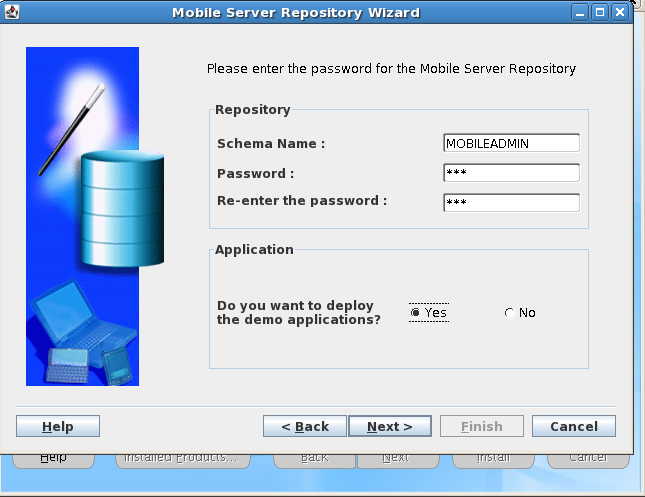
> Give Mobile Server Repository password and select deploy demo application option (if you installed demo application before).


> Here I'm creating new domain in weblogic sever.


> After Mobile Server installation cross check the repository.log file.


Step 3: Install Mobile Development Kit, 


Again run the same runInstaller file and specify the JDK_HOME path.


> Select the Mobile Development Kit option,


Step 4: Testing the Mobile Database Workbench.


> After installation check whether the Mobile Database workbench is working or not. 


> Go to-->mobile client home location-->mobile-->sdk-->bin--> run the oramdw.sh file.


> Here you can create new project.

BEA-141281 unable to get file lock

Error logfile:

<Apr 1, 2013 2:41:03 PM IST> <Info> <WebLogicServer> <BEA-000377> <Starting WebLogic Server with Java HotSpot(TM) 64-Bit Server VM Version 23.5-b02 from Oracle Corporation>
<Apr 1, 2013 2:41:14 PM IST> <Info> <Management> <BEA-141281> <unable to get file lock, will retry ...>
<Apr 1, 2013 2:41:24 PM IST> <Info> <Management> <BEA-141281> <unable to get file lock, will retry ...>
<Apr 1, 2013 2:41:34 PM IST> <Info> <Management> <BEA-141281> <unable to get file lock, will retry ...>
<Apr 1, 2013 2:41:44 PM IST> <Info> <Management> <BEA-141281> <unable to get file lock, will retry ...>
<Apr 1, 2013 2:41:54 PM IST> <Info> <Management> <BEA-141281> <unable to get file lock, will retry ...>

Solution:

cd $MW_HOME/user_projects/domains/<domain_name>/servers/<component_name>/tmp

rm -rf *.lok

Example:

In my case ORACLE PORTAL, FORMS, REPORTS, AND DISCOVERER fusion middleware component threw above error:

Solving method:

[oracle@test1 ~]$ cd $MW_HOME

[oracle@test1 middleware]$ pwd

/oracle/product/middleware

[oracle@test1 middleware]$ ls

as_1
asinst_1
coherence_3.7
domain-registry.xml
logs
modules
ocm.rsp
oracle_common
registry.dat
registry.xml
user_projects
utils
wlserver_10.3

[oracle@test1 servers]$ pwd

/oracle/product/middleware/user_projects/domains/testweblogic/servers.

[oracle@test1 servers]$ ls

AdminServer
AdminServerTag
domain_bak
WLS_DISCO
WLS_FORMS
WLS_REPORTS

Do the same process for (WLS_FORMS and WLS_REPORTS)

[oracle@test1 servers]$ cd WLS_DISCO/tmp

[oracle@test1 tmp]$ rm -rf *.lok