

Showing posts with label Oracle Database 11g. Show all posts
Showing posts with label Oracle Database 11g. Show all posts


How to clone the Oracle Client Software
Cloning
of Oracle Client:
1.
Tar the Oracle Client home from the source server.
tar
-cvf file_name.tar product
2.
scp the tar file to the new server
3.
Untar the file at the location from where we want like the same directory path like the source server. tar -xvf file_name.tar
4.
Now start the cloning.
export
ORACLE_HOME=/opt/oracle/product/11.2.0
export
PATH=$ORACLE_HOME/bin:$PATH:
$ORACLE_HOME/oui/bin/runInstaller
-silent -clone ORACLE_BASE="/opt/oracle/"
ORACLE_HOME="/opt/oracle/product/11.2.0"
ORACLE_HOME_NAME="Oracle11201_client"
-invPtrLoc="/opt/projects/oracle/oraInventory"
Note:
The above command need to run in single line.
Useful
DOC IDs:
- Master Note For Oracle Database Client Installation (Doc ID 1157463.1)
- Install / Deinstall / Cloning Assistant: Oracle Database / Client (Doc ID 1555012.2)
ORAAGENT or ORAROOTAGENT High Resource (CPU, Memory etc) Usage
Issue:
11gR2 Grid Infrastructure oraagent.bin or orarootagent.bin process uses high CPU, memory and threads. If the cluster node is up and running for very long time, it could exhaust memory and swap space which could result in node eviction or other stability issue. With OS "top" or other memory monitoring tool, we can see huge virtual memory is allocated and increasing over
time:
PID USER PR NI VIRT RES SHR S %CPU %MEM TIME+ COMMAND
7242 oracle 18 0 308g 953m 14m S 83.2 0.7 166:28.72 oraagent.bin
In above example, 308GB of virtual memory is allocated to the agent process while it's consuming 83.2% of CPU
Solution:
It's recommended to apply latest patch set or PSU. But if patches are unavailable or can not be applied, the workaround is to kill agent process during off peak hour. There should be no impact as agent will be respawned automatically.
To kill agent process with pid 7242: kill -9 7242
How Parsing Works

1. Include VPD predicates: If Virtual Private Database (VPD, formerly known as row-level security)
is in use and active for one of the tables referenced in the parsed SQL
statement, the predicates generated by the security policies are included in
its WHERE clause.
2. Check syntax, semantics, and access
rights: This step makes sure not only that the SQL statement is correctly
written but also that all objects referenced by the SQL statement exist and the
user parsing it has the necessary privileges to access them.
3. Store parent cursor in a shared SQL
area: Whenever a shareable parent cursor isn’t yet available, some
memory is allocated from the library cache, and a new parent cursor is stored
inside it.
4. Generate execution plan: During this phase, the query optimizer produces an execution plan
for the parsed SQL statement.
5. Store child cursor in a shared SQL area: Some memory is allocated, and the shareable child cursor is
stored inside it and associated with its parent cursor.

Oracle Database Mobile Server Installation Steps
Step by Step Oracle Database Mobile Server Installation
Overall Oracle DB Mobile Server System Architecture,

Step 1: Pre-requisites,
1. Oracle Database.
2. Application Server,
> Oracle Weblogic (I've used Oracle Weblogic 12c).
(or)
> Oracle Glassfish.
(or)
> Oracle Application Server.
Step 2: Installing Database Mobile Server,
Unzip the DMS_11.2.0.0.0_LINUX.zip

> Go to Disk1--> you can find two folders one for linux 32 bit and another one linux 64 bit, In my case I'm using linux64 bit--> Go to Linux64 folder and run the runInstaller file.


> First Install Mobile Server


> For testing purpose I've installed Mobile Server Demo Application

> Here you have to mention your application home path, In my case I've used Oracle Weblogic 12c.

> Need to specify JDK_HOME (Kindly maintain same JDK version)


> During configuration step, It will ask you create Repository.

> Mention your Database hostname, port number and service or SID.

> Give Database SYSTEM user and password.

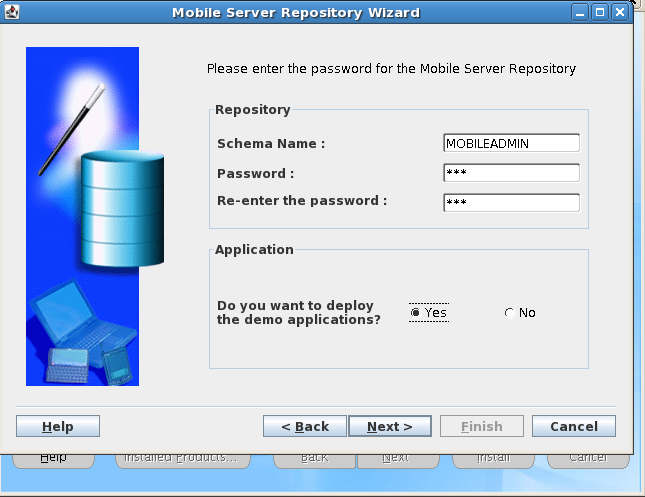
> Give Mobile Server Repository password and select deploy demo application option (if you installed demo application before).


> Here I'm creating new domain in weblogic sever.


> After Mobile Server installation cross check the repository.log file.

Step 3: Install Mobile Development Kit,
Again run the same runInstaller file and specify the JDK_HOME path.

> Select the Mobile Development Kit option,


Step 4: Testing the Mobile Database Workbench.
> After installation check whether the Mobile Database workbench is working or not.

> Go to-->mobile client home location-->mobile-->sdk-->bin--> run the oramdw.sh file.


> Here you can create new project.
EBS Release 12.2 Technology Components
|
Oracle Technology
|
Version included in or required by Release 12.2.2
|
Most Recent Certified Version for Release 12.2
|
|
Oracle Database 11g
|
11.2
|
11.2
|
|
XDK for the Database Tier
|
11.2
|
11.2
|
|
Oracle Application Server (for Application Tier Forms and Reports)
|
10.1.2.3
|
10.1.2.3
|
|
Oracle Application Server/ Oracle Fusion Middleware (for Application
Tier Java Code and Oracle Application Framework)
|
11.1.1.6
|
11.1.1.6
|
|
Oracle Java Required Files (JRF)
|
11.1.1.6
|
11.1.1.6
|
|
XDK for the Application Tier
|
11.1.1.6
|
11.1.1.6
|
|
Oracle HTTP Server
|
11.1.1.6
|
11.1.1.6
|
|
Oracle WebLogic Server
|
Oracle WebLogic Server 10.3.6 in Oracle Fusion Middleware 11g
Release 1 (11.1.1.6)
|
Oracle WebLogic Server 10.3.6 in Oracle Fusion Middleware 11g
Release 1 (11.1.1.6)
|
|
JSP Compiler
|
WebLogic JSP Compiler 11.1.1.6 (weblogic.appc)
|
WebLogic JSP Compiler 11.1.1.6 (weblogic.appc)
|
|
JSP Engine
|
WebLogic JSP Engine 11.1.1.6 (weblogic.appc)
|
WebLogic JSP Engine 11.1.1.6 (weblogic.appc)
|
|
Technology
Components Delivered in APPL_TOP
|
Version included
in or required by Release 12.2.2
|
Most Recent
Certified Version for Release 12.2
|
|
Oracle JDeveloper runtime libraries
|
10.1.3
|
10.1.3
|
|
Oracle BI Beans
|
3.1.1.11
|
3.1.1.11
|
|
Oracle Thin JDBC Drivers (for Application Tier Java Code)
|
11.2
|
11.2
|
|
Externally Installed Oracle
Technology
|
Version included in or required by Release 12.2.2
|
Most Recent Certified Version for Release 12.2
|
|
Oracle Single Sign-On
|
N/A
|
N/A
|
|
Oracle Internet Directory
|
11g Release 1 PS4 (11.1.1.5.0)
|
11g Release 1 (11.1.1.7.0)
|
|
Oracle Access Manager
|
11.1.1.5
|
11.1.2.1
|
|
Oracle Business Intelligence Enterprise Edition
|
11.1.1.6
|
11.1.1.6
|
|
Oracle Discoverer
|
11.1.1.6
|
11.1.1.7
|
|
Oracle WebCenter
|
11.1.1.6
|
11.1.1.7
|
|
Oracle Portal
|
11.1.1.6
|
11.1.1.7
|
|
Oracle BPEL Process Manager
|
11.1.1.6
|
11.1.1.7
|
|
Oracle Secure Enterprise Search
|
11.1.2.2
|
11.1.2.2
|
|
Oracle Collaboration Suite
|
10.1.2
|
10.1.2
|
|
Oracle Universal Content Management
|
10g Release 3
|
10g Release 3
|
|
Oracle Enterprise Manager
|
11.1.0.1
|
11.1.0.1
|
|
Java Technology
|
Version included
in or required by Release 12.2.2
|
Most Recent Certified
Version for Release 12.2
|
|
Java SE Development Kit – JDK
(for Application Tier Java Code and Oracle Application Framework)
|
6
|
6
|
|
Java SE Development Kit – JDK
(for Concurrent Processing Tier)
|
6
|
6
|
|
Native Java Plug-in (for
Client side Java code running in the Browsers)
|
6
|
7
|
Subscribe to:
Posts (Atom)