
Step by Step Oracle Database Mobile Server Installation
Overall Oracle DB Mobile Server System Architecture,

Step 1: Pre-requisites,
1. Oracle Database.
2. Application Server,
> Oracle Weblogic (I've used Oracle Weblogic 12c).
(or)
> Oracle Glassfish.
(or)
> Oracle Application Server.
Step 2: Installing Database Mobile Server,
Unzip the DMS_11.2.0.0.0_LINUX.zip

> Go to Disk1--> you can find two folders one for linux 32 bit and another one linux 64 bit, In my case I'm using linux64 bit--> Go to Linux64 folder and run the runInstaller file.


> First Install Mobile Server


> For testing purpose I've installed Mobile Server Demo Application

> Here you have to mention your application home path, In my case I've used Oracle Weblogic 12c.

> Need to specify JDK_HOME (Kindly maintain same JDK version)


> During configuration step, It will ask you create Repository.

> Mention your Database hostname, port number and service or SID.

> Give Database SYSTEM user and password.

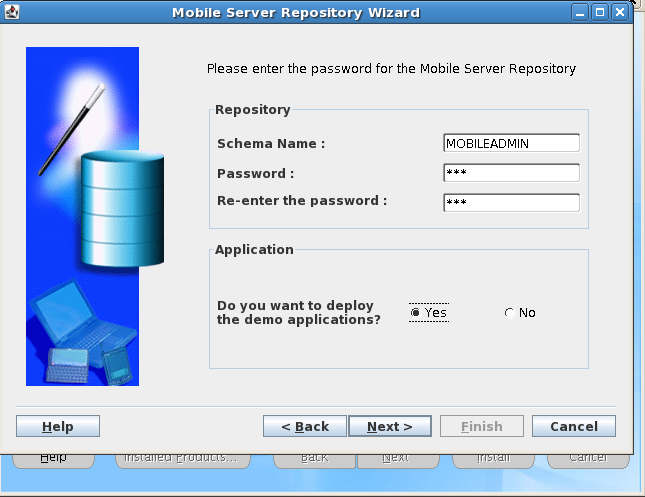
> Give Mobile Server Repository password and select deploy demo application option (if you installed demo application before).


> Here I'm creating new domain in weblogic sever.


> After Mobile Server installation cross check the repository.log file.

Step 3: Install Mobile Development Kit,
Again run the same runInstaller file and specify the JDK_HOME path.

> Select the Mobile Development Kit option,


Step 4: Testing the Mobile Database Workbench.
> After installation check whether the Mobile Database workbench is working or not.

> Go to-->mobile client home location-->mobile-->sdk-->bin--> run the oramdw.sh file.


> Here you can create new project.
